Parking lot accident diagram: a worked example
Published: 2026-08-07 · Updated: 2026-08-18
Written and reviewed by the My Traffic Sketch editorial team · How our guides are made
Parking lot collisions are a situation many drivers will face at some point, and they are deceptively hard to diagram: no lanes, odd angles, and both parties usually claiming the other 'came out of nowhere'. Stall geometry is your best witness.
The scenario
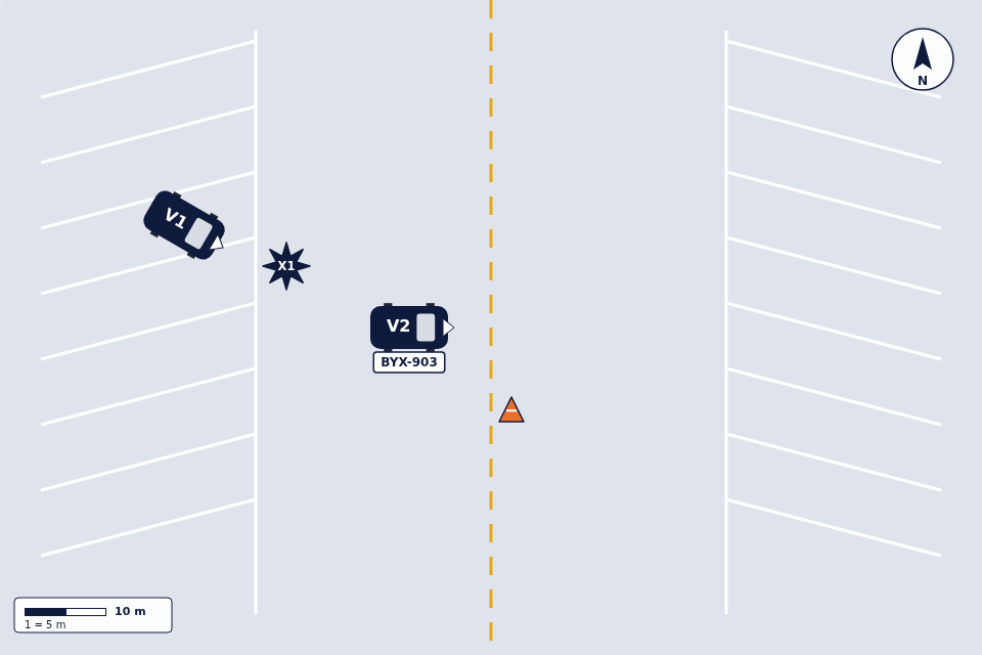
In an angled lot, V1 backs out of a stall while V2 travels along the aisle. The impact point X1 sits at the stall line: exactly the fact both drivers will argue about, which is why the diagram marks it explicitly.
Why stall geometry matters
Angled stalls imply a direction of flow: you nose into a '/' stall from one side only. Drawing the correct stall pattern (the editor has angled '/' and '\' templates, plus vertical variants) silently documents which way the aisle runs. And therefore which driver was moving against expectations.
V1's rotation tells the story: a car drawn half-out of its stall at an angle is mid-maneuver. A car drawn parallel to the aisle has already left the stall. Those are different collisions.
Details worth adding in a lot
- ▸The cart corral, cone or parked SUV that blocked the sight line.
- ▸Distance from the stall line to the impact point: usually the decisive measurement.
- ▸Arrows for both vehicles, even the slow one: 'backing at walking speed' is still a direction.
- ▸Plates and descriptions, because lots produce many near-identical vehicles.
The measurements that matter in a lot
Parking lots rarely have painted center lines or stop bars, so the stall grid itself becomes your reference system. Useful numbers for a back-out collision like this one (values illustrative):
- ▸From the stall line to the impact point — e.g., X1 approx. 1.5 m into the aisle. This is usually the decisive distance: it says how far out V1 had come.
- ▸Aisle width. A 6 m aisle and a 4 m aisle imply very different times available to react.
- ▸How far V2 traveled after impact, from X1 to its rest position.
- ▸The distance from the sight obstruction (the parked SUV, the corral) to V1's stall: it defines when each driver could first have seen the other.
Common mistakes specific to parking lots
Two errors show up in lot diagrams over and over. First: drawing the lot as an empty rectangle. Without the stall pattern, 'V1 backed out' has no geometry. The reader cannot see which way backing out points a car. The template's stalls carry that information for free. Second: leaving out the third vehicle. The parked car or cart corral that blocked the sight line belongs in the drawing precisely because it did not move: it explains why neither driver saw the other, which is usually the entire story of a lot collision.
Recreate it
Pick the angled parking template matching the lot's direction, place V1 half-out of a stall at an angle, put V2 in the aisle, mark X1 at the stall line and add one measurement. Five elements, complete story.
For a perpendicular (90°) lot the method is identical with the vertical parking template. The only difference is that backing out of a perpendicular stall sweeps a wider arc, so V1's angle at impact tends to be steeper. Draw the angle you observed, not the angle a tidy diagram would prefer.
Why lot diagrams deserve extra care
Many parking lot collisions happen on private property, and depending on where you are, police may not respond to a minor lot crash at all. When that happens, your diagram and photos can end up being the only scene documentation that exists: there is no officer's sketch to fall back on. That is a reason to draw it while both cars are still where they stopped, or at least to photograph rest positions from two angles before anyone moves. Low speed does not mean low stakes: the drivers disagree about who was moving just as strongly at 8 km/h as at 80.
Ready to draw your own diagram? The editor is free and needs no account.
Open the free sketch tool