Rear-end collision diagram: a worked example
Published: 2026-08-07 · Updated: 2026-08-18
Written and reviewed by the My Traffic Sketch editorial team · How our guides are made
A rear-end diagram looks trivial — two cars, one behind the other — but the useful information lives in the details around that picture: how far back the skid starts, whether the lead car was stopped or moving, and how square the impact was.
The scenario
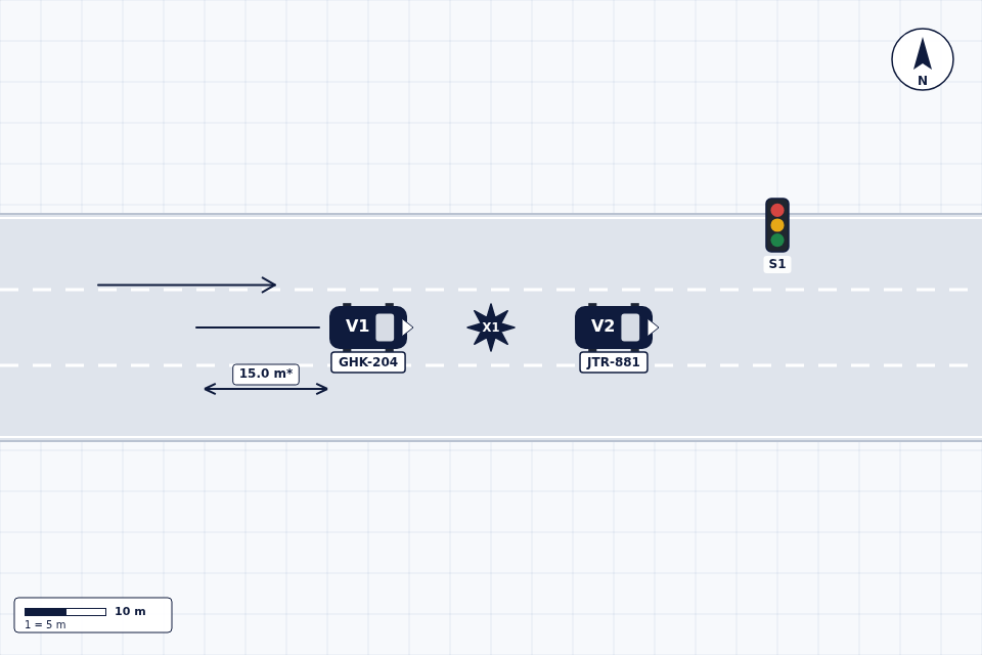
V2 is stopped at a signal (or slowing in queue). V1 approaches in the same lane and strikes V2 from behind. Impact point X1 sits between V1's front and V2's rear. So far, any sketch shows this. Now the parts that matter:
The three details that make it useful
- ▸Braking evidence: draw the skid mark as a line behind V1 and measure it. Skid length can provide useful context in a rear-end case, depending on the circumstances.
- ▸The lead vehicle's state: stopped at a light? Note the signal in the diagram and say 'stopped' in the narrative. Moving slowly? The arrow lengths can suggest relative speeds, and the narrative should state them.
- ▸Impact alignment: dead-center, or offset toward a corner? An offset impact often means a late lane change or an attempted swerve: draw the vehicles with the true overlap.
A worked pass, with numbers
Put the three details to work on a concrete version of the scenario (every value here is illustrative, chosen to show the method): V2, a white hatchback, is stopped at a red signal in the right lane. V1, a pickup, approaches in the same lane and begins braking approximately 12 m before X1, leaving a straight skid in-lane. The impact is offset toward V2's left-rear corner rather than square.
On the diagram that becomes: V2 drawn square in its lane at the stop line with the signal symbol at the corner and 'stopped' reserved for the narrative; V1 behind it with one straight arrow, the skid drawn as a line starting 12 m back (dimension line labeled 'approx. 12 m'); the two vehicles overlapped at the true contact corner, with X1 on that corner. A reader now sees, without any text: V1 was moving, braked for about three car lengths, did not fully stop, and struck V2 left-of-center. Which is consistent with the start of an evasive move to the left.
Notice what was NOT drawn: no invented pre-braking speed, no assumed following distance, no reconstruction. The diagram records marks and positions; conclusions about speed or reaction belong to whoever analyzes it with proper methods.
Stopped, rolling, or slowing: say which
The lead vehicle's state at impact is the single most disputed fact in rear-end collisions, and the diagram should commit to what is actually known. If V2 was fully stopped, anchor it: distance from V2's front bumper to the stop line or the vehicle ahead. If V2 was rolling, give it a short arrow and state the approximate queue speed in the narrative as reported ('V2 slowing with traffic, driver reports ~10 km/h'). If nobody knows, the honest move is an arrowless V2 and a narrative sentence that says the state is disputed. A diagram that quietly picks a side stops being documentation.
Multi-vehicle chains
For a chain (V1 pushes V2 into V3), number the vehicles from the rear-most striking car forward and mark each impact point separately (X1, X2). The narrative should state the order of impacts if known: the diagram alone cannot prove sequence.
Chains also reward one extra measurement per gap: the final distance between V2's front and V3's rear, and whether V3 was pushed past the stop line. Those two numbers are usually what distinguishes 'V2 was pushed into V3' from 'V2 hit V3 first' in the accounts you will hear. Record them while they exist.
Draw it
Use the one-way road or highway template, place V2 (and V3) in the lane, place V1 behind with a skid line and a measurement, add the signal if there was one, mark the impact points and export. The report sheet adds the vehicle table with each plate and description, so the white hatchback and the pickup stay identifiable long after the scene is cleared.
Ready to draw your own diagram? The editor is free and needs no account.
Open the free sketch tool